ILOM Administration Guide
ILOM--T5240
When you power on the system, the boot process begins under the control of the Integrated Lights Out Manager (ILOM) system console. The system console displays status and error messages generated by firmware-based tests during system startup.
Back Side of T5240
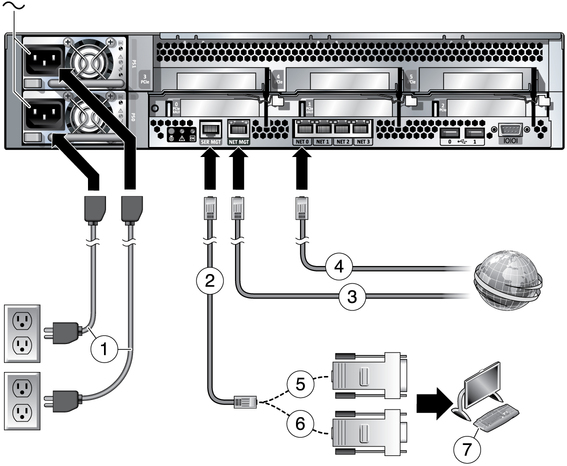
1- Power Cable Ports
2- Serial Network Mgnt Port
3- Network Mgnt Port
4- NIC Ports
5,6- Cross Cable RJ-45 & DB9
Power on System:
--> start /SYS
Are you sure you want to start /SYS (y/n)? y
Starting Service Processor:
--> start /SP/console
Are you sure you want to start /SP/console (y/n) ? y
Serial console started. To stop, type #.
Checking Network information of SP:
--> show /SP/network - it will give you ip address and netmask and Gateway address
Configuring the IP address for SP:
-->set /SP/network pendidngdiscovery=static
--> set /SP/network pendingipaddress=10.10.10.10
-->set /SP/network pendinggateway=10.10.10.1
-->set /SP/networkpendingnetmask=255.255.255.0
now we are configured inetwork to Service processor. Now we have to save the confuguration
--> set /SP/network pendingcommit=true --it will save the configured networkinformation
we configured and save the network for SP. now we have to enable the Network, use below command to enable the netwrok
--> set /SP/network state=enabled -- it will enable the network to SP
we need to shutdown the server from console with below command
--> stop /SYS
the we need to send break to boot up server while booting, use below command to send break
--> set /HOST send_break_action=true
then we have to set auto boot to false, use below command to set
--> set /HOST/bootmode script="setenv auto-boot? false"
then we have to reset the /SYS with below command
--> reset /SYS
then we need to start /SYS with below command
--> start /SYS
then start console with below command
--> start /SP/console
Are you sure you want to start /SP/consloe (y/n)? y
console started. To exit, type #.
ok>
Checking Network information of SP:
--> show /SP/network - it will give you ip address and netmask and Gateway address
Configuring the IP address for SP:
-->set /SP/network pendidngdiscovery=static
--> set /SP/network pendingipaddress=10.10.10.10
-->set /SP/network pendinggateway=10.10.10.1
-->set /SP/networkpendingnetmask=255.255.255.0
now we are configured inetwork to Service processor. Now we have to save the confuguration
--> set /SP/network pendingcommit=true --it will save the configured networkinformation
we configured and save the network for SP. now we have to enable the Network, use below command to enable the netwrok
--> set /SP/network state=enabled -- it will enable the network to SP
How to go to OK prompt from the console in already running Server:
we need to shutdown the server from console with below command
--> stop /SYS
the we need to send break to boot up server while booting, use below command to send break
--> set /HOST send_break_action=true
then we have to set auto boot to false, use below command to set
--> set /HOST/bootmode script="setenv auto-boot? false"
then we have to reset the /SYS with below command
--> reset /SYS
then we need to start /SYS with below command
--> start /SYS
then start console with below command
--> start /SP/console
Are you sure you want to start /SP/consloe (y/n)? y
console started. To exit, type #.
ok>
Comments
Post a Comment